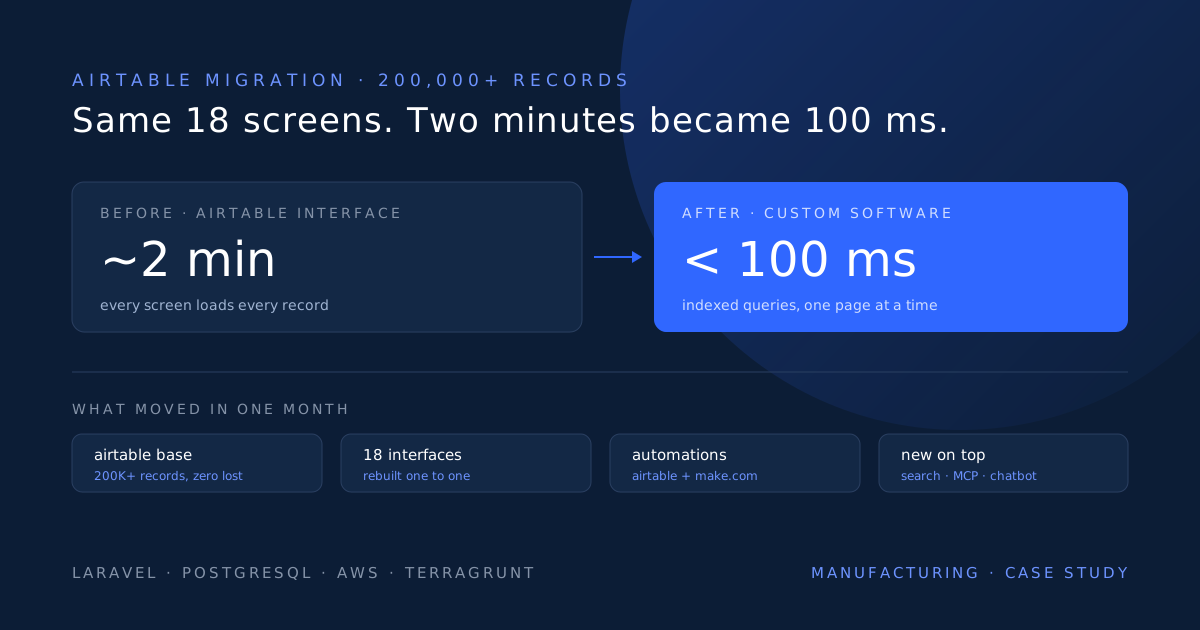
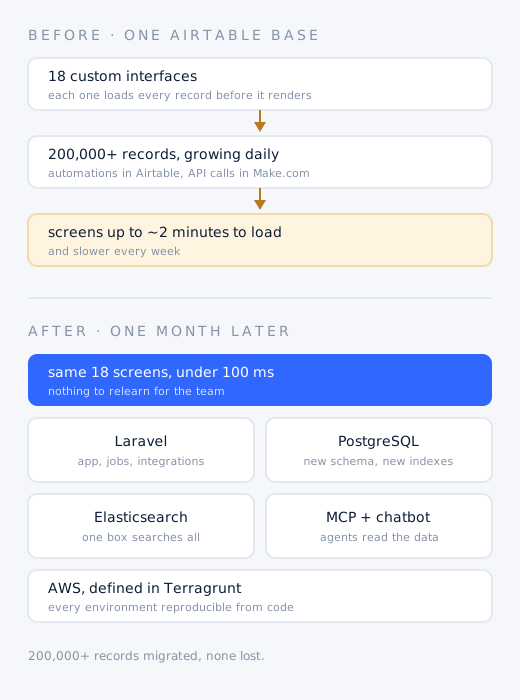
More than 200,000 records in one Airtable base, worked through 18 custom interfaces. Airtable interfaces load every record behind a screen before showing it, so each day of new data made every screen slower. Some took close to two minutes to open, and external API calls ran through a separate layer of Make.com scenarios.
A custom system on Laravel and PostgreSQL, hosted on AWS and defined in Terragrunt. All 18 interfaces rebuilt to look and behave exactly the same. Every record migrated, every Airtable automation and Make.com scenario rebuilt as code, and the database restructured with a new indexing strategy.
Live within one month with no data lost. Every page loads in well under 100 milliseconds, and keeps doing so as records grow. On top: one search box across all the data, read only MCP servers for their AI agents, and an internal chatbot that answers questions about their own records.
| Records migrated | 200,000+ | Zero data loss, reconciled table by table |
| Interfaces rebuilt | 18 | One to one, no retraining needed |
| Page load before | Up to ~2 minutes | Airtable interfaces, getting slower every day |
| Page load after | Under 100 ms | Every page, flat as records keep growing |
| Automations migrated | All | Every Airtable automation and Make.com scenario |
| Kickoff to cutover | 1 month | Including data migration and infrastructure |
We cannot name the client: the engagement is covered by an NDA and the manufacturer is described here in anonymized form. Load times are the times employees experienced in the Airtable interfaces before the migration and in the rebuilt system after it.
Below is the build in detail, organized around the questions we hear most from teams whose Airtable base has started to slow down.
Why does Airtable get so slow with a lot of records?
Airtable interfaces load every record in the table or view they are built on before they show anything, instead of fetching only the page you are looking at. Load time therefore grows with the size of the table, not with what is on screen. At 200,000 records some of this client's interfaces took close to two minutes, and they slowed down further every day as new records arrived. Linked records, lookups, rollups and formulas add to it, because Airtable recalculates them across the whole base.
- Load time scales with total records, not with the rows on screen
- Every new record makes every interface on that table slower
- Lookups, rollups and formulas are recalculated across the whole base
- Record limits per base mean a growing base eventually runs out of plan as well as speed
Can you leave Airtable without changing the interface for your team?
Yes. We rebuilt all 18 Airtable interfaces one to one: the same layouts, the same fields in the same order, the same filters, buttons and statuses. The team did not need training, because on the first morning the new system looked exactly like the one they used the day before. The only difference employees noticed was speed, with every page loading in well under 100 milliseconds.
How do you migrate 200,000 Airtable records without losing data?
By rehearsing the migration until it is boring. We exported the full base through the Airtable API, mapped every field type to a proper PostgreSQL column, and turned linked records into real foreign keys. The migration ran repeatedly against copies of production data, and each run was reconciled table by table, record counts and field values, until there were zero differences. The final cutover was a short freeze, one last sync and a reconciliation pass. Not a single record was lost.
- Every Airtable field type mapped to a typed PostgreSQL column
- Linked records converted to foreign keys with integrity enforced by the database
- Formulas, lookups and rollups rebuilt as tested code and checked against the base on the full dataset
- Repeated dry runs on production copies, reconciled until counts and values matched exactly
- A short freeze for the final sync, then a last reconciliation pass before go live
What happens to Airtable automations and Make.com scenarios?
They become code. Every Airtable automation and every Make.com scenario was rebuilt as a Laravel job, event listener or scheduled task, including all the external API calls that used to run through Make.com. Each job is version controlled, tested, retried when an outside service fails, logged, and raises an alert when it cannot complete. There are no per operation fees and no monthly caps, and all the business logic now lives in one codebase instead of three tools.
How long does it take to migrate off Airtable?
This migration took one month from kickoff to cutover: more than 200,000 records, 18 interfaces, all Airtable automations and all Make.com scenarios. The timeline depends mostly on how many interfaces and automations a base has, and much less on the number of records. Data volume is handled by scripts; interfaces and business rules are what take engineering time.
What did we build it on?
- Laravel for the application, the rebuilt interfaces, background jobs and every external integration
- PostgreSQL as the database, with a refactored schema and a new indexing structure designed per screen
- Fully hosted on AWS
- Terragrunt for infrastructure as code, so every environment can be reviewed, reproduced and rebuilt from the repository
- Elasticsearch for full text search across all of the data
Why is the new system fast?
Because it only does the work a screen needs. Each page queries the rows it displays, one page at a time, against indexes designed for that exact query. We refactored the database structure while migrating, so values Airtable recalculated on every load are now stored relations and indexed columns. The result is page loads well below 100 milliseconds, and response times that stay flat as the record count keeps growing.
What could we add that Airtable could not do?
- One search box for everything: Elasticsearch indexes all the data, so any record in any table is found from a single search field
- A refactored database with a new indexing structure, so performance holds as data grows
- Read only MCP servers, so the client's own AI agents can query their business data safely without being able to change it
- An internal chatbot inside the system, so employees can ask questions about their own data in plain language
When is it time to move off Airtable?
When the tool starts costing the team time instead of saving it: screens that take seconds or minutes to load, a base nearing its record limit, automations scattered across Airtable and Make.com, or data you want to search or hand to AI agents. These are the signs we see most often, and this client had all of them.
- Interfaces or views take seconds, or minutes, to load, and get slower each month
- The base is approaching the record limit of its plan
- Automations are split between Airtable and Make.com or Zapier, and nobody has the full picture
- You want search across all your data, or want AI agents to work with it
- The base has become critical to the business, and only one or two people dare to change it
Why custom manufacturing software instead of another no code tool?
Because the limits were structural, not a matter of picking a different app. A manufacturer's data only grows: orders, production records and history accumulate every day, and a tool that loads everything behind a screen gets slower with every one of them. Custom software is built around the company's own process, queries only what each screen needs, keeps its business rules in one tested codebase, and can be extended with search and AI without waiting for a vendor roadmap.
How is an Airtable migration priced?
As a fixed price. After one scoping call where we look at the base, its interfaces and its automations, we send a fixed quote in writing within 48 hours. When the project is done, the client owns all of the code and the infrastructure.
Want us to build yours?
This is the kind of product we design, build and ship end to end: fixed scope, production-grade, live in weeks. Tell us what you're building and we'll say straight if it's a fit.